
How to check Codex usage limits on a ChatGPT plan
When you sign in to Codex with ChatGPT, your plan sets how much you can use it. This guide explains how those limits work, where to check what's left, on the web and in the Codex CLI, and what to do when you reach one.
How Codex limits work
Codex is included in the ChatGPT Free, Go, Plus, Pro, Business, Edu and Enterprise plans. How much of it you can use depends on the plan:
- A five-hour window on some plans. OpenAI publishes estimates of local messages per five-hour period for Plus and Standard Business. Pro plans currently have no five-hour limit.
- Weekly limits may also apply.
- One allowance for local and cloud work. Local messages and cloud chats share your plan's usage allowance. ChatGPT Work also shares usage with Codex: inside ChatGPT it uses the same usage limits.
- Flexible pricing. Enterprise and Edu users with flexible pricing have no fixed rate limits; usage scales with credits.
This guide doesn't copy the per-plan estimates. The Codex pricing page has the current ones.
Check on the web
Open the Codex usage dashboard while signed in to ChatGPT. It shows your current limits.
Check in the Codex CLI
/statusshows your remaining usage limits during a session, such as the five-hour and weekly windows, along with the session's configuration and token usage./statuslinekeeps them on screen. Turn on the rate-limits item in the picker and the footer updates right away; the choice is saved totui.status_lineinconfig.toml./usageshows your ChatGPT token activity, daily, weekly or cumulative. When you have an earned rate-limit reset, it's also where you redeem it.codex login status, run in your shell, prints the active authentication method, so you can confirm you're signed in with ChatGPT rather than an API key.
When you reach a limit
- A turn already running can continue. If you reach your limit during an active turn, the agent can keep working on that turn, subject to fair use limits.
- Buy credits. Plus and Pro users can buy additional credits to keep working without upgrading their plan. Business, Edu and Enterprise plans with flexible pricing can buy additional workspace credits.
- Use an API key for local chats. Anyone can run extra local chats with an API key, charged at standard API rates.
- Or wait for the reset. The usage dashboard and
/statusshow where each limit stands.
Keep Codex limits in view with notch-limits
notch-limits is a small Mac app that keeps your Codex limits around the MacBook notch, next to your Claude Code accounts.
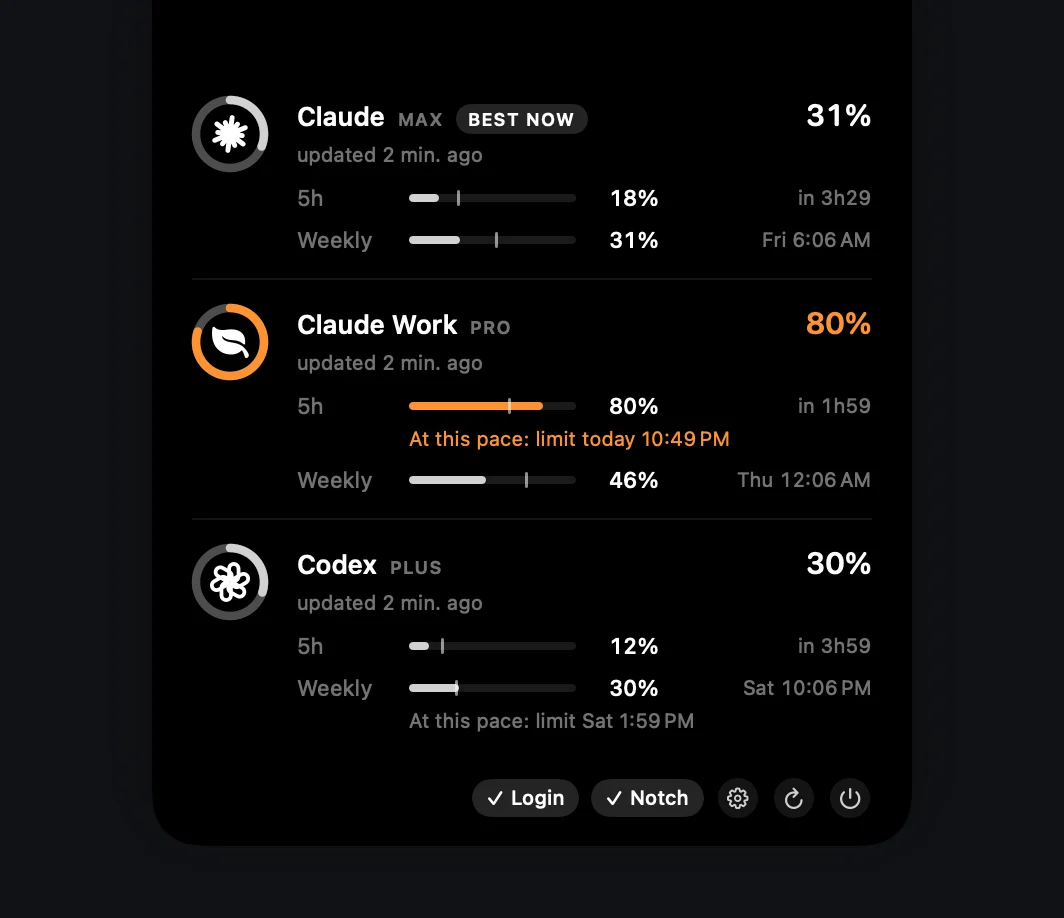
- No request for most updates. Codex writes its rate limits to the session logs in
$CODEX_HOME/sessionson every response. notch-limits reads the latest ones and only calls the usage endpoint when that data is more than 10 minutes old. Opening the panel never makes a request. - Every window Codex reports. Hover the notch to see each one with its percentage and reset time. Rings stay gray, turn orange from 70% and red from 90%.
- Found on its own.
~/.codex, and folders such as~/.codex-team, show up as accounts when they contain anauth.json, at launch and whenever you open Settings. A Codex home kept anywhere else goes inaccounts.json. - Read-only. It reads the login in
auth.jsonand never refreshes, rewrites or uploads tokens anywhere other than the official usage endpoint.
Good to know
- Codex can keep its login in your operating system's credential store instead of
auth.json. Thecli_auth_credentials_storesetting decides:filewritesauth.jsonunderCODEX_HOME,keyringuses the credential store, andautouses the credential store when it's available and falls back toauth.jsonotherwise. - notch-limits reads only
auth.json, so it doesn't find a Codex login kept in the credential store. To check, look forauth.jsonin your Codex home (~/.codexby default).
Get notch-limits
Free, open source and native. No account of its own, no telemetry.
curl -fsSL https://raw.githubusercontent.com/matheusm/notch-limits/main/install.sh | bash
macOS 14+ · Apple Silicon & Intel · 3 MB download. The one-line install puts the app in ~/Applications with no Gatekeeper prompt. The DMG isn't notarized yet: on first launch, open System Settings → Privacy & Security and click Open Anyway.
Next: use multiple Claude Code accounts with CLAUDE_CONFIG_DIR →
Sources
- Codex docs: Pricing
- Codex docs: CLI slash commands (
/status,/statusline,/usage) - Codex docs: Developer commands (
codex login status) - Codex docs: Authentication (
cli_auth_credentials_store) - notch-limits README: How it works
- notch-limits README: Configuration
notch-limits is an unofficial community project, not affiliated with or endorsed by Anthropic or OpenAI. Plans and limits change; the linked docs are the source of truth.