
notch-limits
Claude Code & Codex usage limits, right at your Mac's notch.
$ curl -fsSL https://raw.githubusercontent.com/matheusm/notch-limits/main/install.sh | bash
One ring per account.
Each ring fills with the limit you'll hit first, the highest of that account's 5-hour session, weekly and per-model windows. Hover the notch to see every window, its percentage and exactly when it resets.
Local-first. Quiet on the network.
Claude Code and Codex already write your usage to disk. notch-limits reads those snapshots first and only asks the official usage endpoint when the newest data is more than 10 minutes old.
- Opening the panel never makes a request. It just re-reads local files.
- Credentials are read, never written. It reuses the login your CLIs keep in the Keychain and
auth.json. - No servers, no telemetry. Tokens only ever go to Anthropic or OpenAI.
- Every account shows its data age, and the label turns orange after 15 minutes.
~/.claude.jsonwritten by Claude Code~/.claude-work/.claude.jsonone per CLAUDE_CONFIG_DIR~/.codex/sessions/**/*.jsonlwritten on every Codex replyapi.anthropic.com/api/oauth/usage
chatgpt.com/backend-api/wham/usage
Every account you juggle.
Personal Max, a work Team plan, a ChatGPT plan for Codex: each gets its own ring and its own icon. Sign in once per config folder and notch-limits finds it. No JSON to write.
- Found automatically. Accounts in
~/.claude*and~/.codex*show up at launch and whenever you open Settings. Folders kept anywhere else still go inaccounts.jsonby hand. - Settings, no restart. Show, hide, rename, reorder and pick an icon from the gear. Changes apply at once, without a network request.
# ~/.zshrc: one login per config dir
alias claude-work='CLAUDE_CONFIG_DIR=$HOME/.claude-work claude'
~/.claude.jsonClaude~/.claude-work/.claude.jsonClaude Work~/.codex/auth.jsonCodex~/.config/notch-limits/accounts.json
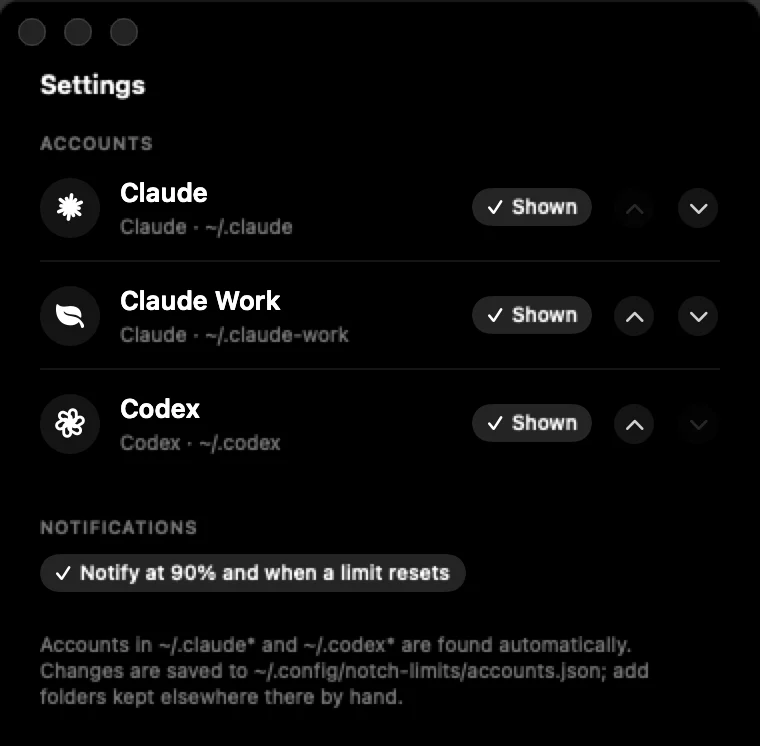
~/.claude-work.Know before you hit it.
A percentage says where you are, not whether you'll make it to the reset. notch-limits now projects your pace, points to the account with the most headroom, and can tell you when a limit is close or free again.
- Pace on every bar. A faint tick marks where usage would be if spread evenly over the window. Run ahead of it and the panel says when you'll hit the limit: "At this pace: limit today 4:26 PM". It's a straight-line projection from the latest reading, shown once 15% of the window has passed.
- Best now. With two or more accounts of the same provider, the one with the most headroom gets a small tag. Claude and Codex accounts are ranked separately.
- Notifications, if you want them. A heads-up when a limit reaches 90%, and another when a limit you hit resets: "Claude Work is available again". Off by default, no sound, no extra requests.
Install in a minute.
A tiny universal app that lives in the notch and falls back to the menu bar on Macs without one. English, Português and Español.
Download the app
Open the DMG and drag Notch Limits to Applications.
NotchLimits.dmgNot notarized yet: on first launch, open System Settings → Privacy & Security and click Open Anyway.
One-line install
Downloads the latest release into ~/Applications and opens it. No Gatekeeper prompt.
curl -fsSL https://raw.githubusercontent.com/matheusm/notch-limits/main/install.sh | bash
Read the script before piping it to bash.
Build from source
Pure Swift and SwiftUI, no dependencies. Needs the Xcode Command Line Tools.
git clone https://github.com/matheusm/notch-limits
cd notch-limits && ./build.sh
Requires macOS 14 Sonoma or later and a Claude Code (Pro, Max or Team) and/or Codex (ChatGPT) login.