
Hit the Claude Code usage limit? What it means and what to do
"You've hit your session limit" means one of your plan's usage windows has run out, and Claude Code stops sending requests until it resets. This guide explains each limit message, what you can do right away, the errors that look like a limit but aren't, and how to see the next one coming.
What the message means
Claude subscription plans include a rolling usage allowance. When part of it runs out, Claude Code shows one of these messages and blocks further requests until the reset time it names:
You've hit your session limit · resets 3:45pm
You've hit your weekly limit · resets Mon 12:00am
You've hit your Opus limit · resets 3:45pm
You've hit your Sonnet limit · resets 3:45pm
| Limit | Applies to | Does switching models help? |
|---|---|---|
| Session | Every model | No |
| Weekly | Every model | No |
| Opus | Opus models only | Yes: pick a model outside the Opus family |
| Sonnet | Sonnet models only | Yes: pick a model outside the Sonnet family |
- Both windows count at once. Usage counts against the session and weekly allowances at the same time, so one heavy burst can use up the weekly allowance before the session window resets.
- Switching models has a cost. Each model has its own prompt cache, so the first request after
/modelre-reads the whole conversation with no cache hits. - "Usage limit reached · wrapping up" means you hit the five-hour limit while Claude was answering. Claude Code may keep going briefly to finish the step in progress. That allowance is small, capped and counts toward your weekly limit, and it never applies to a new message.
How the five-hour and weekly windows open and reset is covered in The limits Claude Code counts against.
What you can do now
The Claude Help Center's short answer is to wait for the reset or upgrade your plan. Claude Code gives you a few more options.
Wait, and let Claude Code continue on its own
Since Claude Code v2.1.234, an interactive session signed in with a claude.ai subscription waits in the open session and picks the task up again after the limit resets. It's on by default. While it waits, the bottom of the session shows:
Usage limit reached · limit resets 3:45pm
Continuing automatically at 3:45pm · Esc to cancel
Keep the session open. At the reset, Claude Code prompts Claude to continue where it stopped; it doesn't resend your last message. It still asks for permissions as usual, so the task can pause on a prompt while you're away. After three automatic continuations without a new prompt from you, it stops and points you to /rate-limit-options.
- To cancel: press
Escat an empty prompt, orCtrl+C, while the lines show. Or run/rate-limit-optionsand pick Don't continue automatically. - When it doesn't start on its own: when the reset is more than 24 hours away, as a weekly limit can be; in Remote Control and agent team teammate sessions; and after an Opus or Sonnet limit while you run a model outside that family. At your own terminal, Claude Code then opens the usage-limit options menu, where Wait here, then continue automatically starts the wait.
- When it isn't offered: in background sessions and
-pruns, and with API keys or cloud providers, which are metered per request, so there is no reset to wait for. - To turn it off: in
/config, turn off Continue automatically at usage limit, or setautoContinueAtUsageLimittofalsein your user settings. The Claude Desktop app's Code tab has its own Auto-continue when limits reset checkbox, set separately.
Switch models, for an Opus or Sonnet limit
After "You've hit your Opus limit" or "You've hit your Sonnet limit", run /model and pick a model outside that family to keep working. It won't get you past the session or weekly limit, which every model shares. If you switch during an automatic wait, Claude Code checks whether usage is available again and continues right away if it is.
Add usage credits
Usage credits let you keep working past your plan's limit. Run /usage-credits while signed in with your claude.ai subscription:
- Pro, Max and Ultra: it opens Settings → Usage on claude.ai, where you turn usage credits on, add funds and can set a monthly spend limit.
- Team and Enterprise: it opens your organization's usage settings if you have billing access. If you don't, it asks you to confirm, then sends a request to your admins.
Usage credits are billed at standard API rates, separately from your subscription. They are also separate from the monthly API credits included with Max and Ultra, which can't be used in Claude Code. Once credits are on, /usage shows a usage-credits row. If Claude Code is waiting for a reset when you finish adding credits with /usage-credits, it checks again and continues right away if usage is available.
Upgrade, or pay per use with a Console account
A higher plan raises your base limits; claude.com/pricing lists the plans. Alternatively, a Claude Console account bills Claude Code per token through API credits instead of a plan allowance.
Check your environment before you rely on your subscription: if ANTHROPIC_API_KEY is set, Claude Code uses that key instead of your subscription, and you are charged for API usage.
Messages that are not your plan limit
Some errors look like a limit but have nothing to do with your plan's allowance:
API Error: Server is temporarily limiting requests (not your usage limit). A short-lived throttle on the API side, unrelated to your quota. Since v2.1.199, Claude Code retries it automatically before showing it. Wait briefly and try again; if it persists, check status.claude.com.API Error: Repeated 529 Overloaded errors. The API is at capacity across all users. It isn't your usage limit and doesn't count against your quota. Try again in a few minutes, or switch models with/model, since capacity is tracked per model.API Error: Request rejected (429). You hit the rate limit of an API key, an Amazon Bedrock project or a Google Cloud project. Run/statusand confirm the active credential is the one you expect: a strayANTHROPIC_API_KEYin your environment can route requests through a low-tier key instead of your subscription.rate limited until 3:14aminside/usage. Only the usage display is limited: Claude Code can't fetch your plan limits again until then. Your work with Claude isn't affected. Pressrafter that time for fresh numbers.
A context or auto-compact warning isn't a usage limit either. It means the conversation is close to the point where Claude Code summarizes older history to free space.
See it coming next time
Claude Code can warn you before a window runs out, with a message such as You've used 85% of your session limit · resets 3:45pm. Before that point, you have two ways to check:
/usageshows your plan usage bars and a breakdown of what counts against your limits, with suggested changes. More on/usage.- A custom status line can show the
rate_limitsfields, so your remaining allowance stays on screen in that terminal.
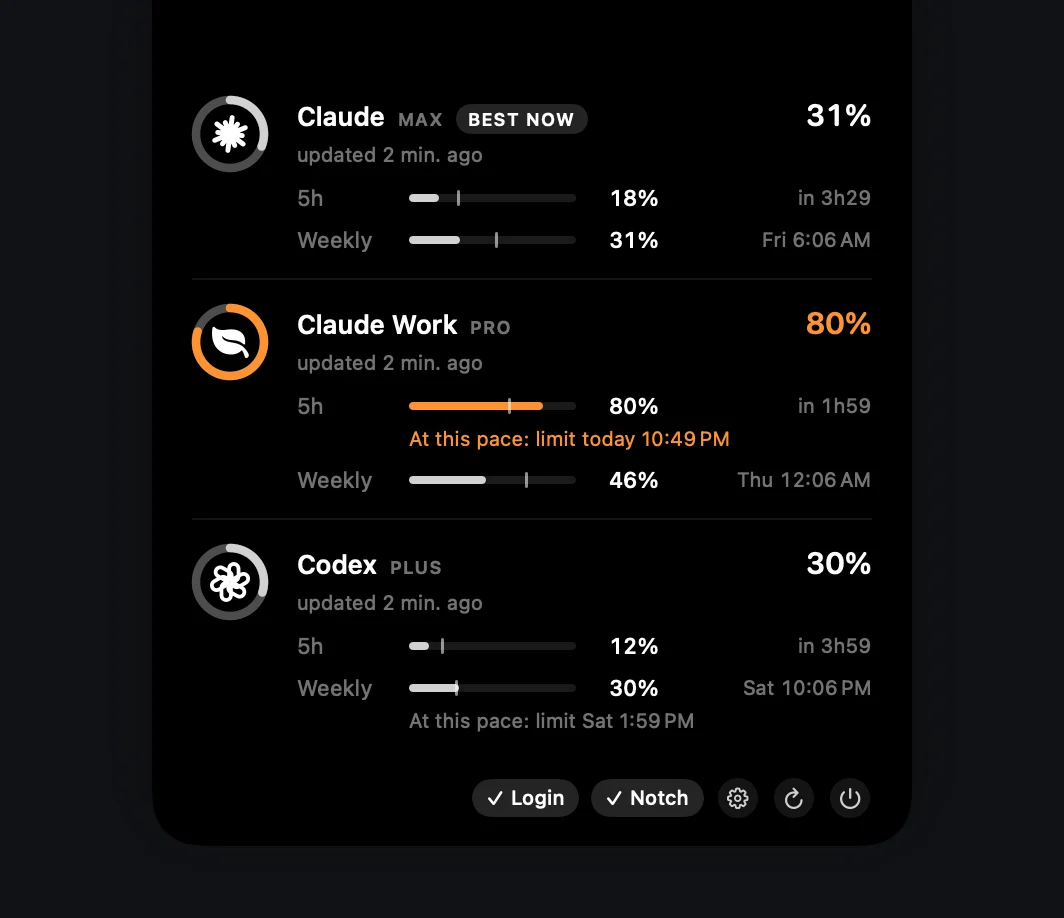
Both show the account of the terminal you're in. notch-limits is a small Mac app that keeps every account's limits around the MacBook notch, so the next limit doesn't come as a surprise:
- Quiet until it matters. Rings stay gray, turn orange from 70% and red from 90%.
- Pace, not just percent. A faint tick on each bar in the notch panel marks where usage would be if spread evenly over the window. If you're on track to hit a limit before it resets, the panel says when: "At this pace: limit today 4:26 PM". It's a straight-line projection from the latest reading, shown once 15% of the window has passed.
- Optional notifications. A heads-up when a limit reaches 90%, and another when a limit you hit resets. Off by default; turn them on in Settings.
- Best now, for accounts you already keep. If you use separate accounts for separate reasons, such as personal and work, the one with the most headroom gets a "Best now" tag. Use multiple Claude Code accounts shows the setup.
- Local-first. It reads the usage snapshot Claude Code already writes, and only calls the usage endpoint when that data is more than 10 minutes old. Opening the panel never makes a request.
Make your allowance last
Claude Code sends your whole conversation with every request, so a long session draws more of your limits than its last message suggests. A few habits from Anthropic's guide to reducing token usage:
- Clear between tasks.
/clearstarts fresh when you switch to unrelated work, and costs nothing. - Compact with a focus.
/compact Focus on code samples and API usagetells Claude what to keep. Compacting reads the whole conversation, so it is a large request in itself. - Match the model and effort to the job. Sonnet handles most coding tasks well and costs less than Opus, and a lower
/effortlevel suits simpler tasks. - Follow the
/usagebreakdown. It suggests a change for any habit behind 10% or more of your recent usage.
Get notch-limits
Free, open source and native. No account of its own, no telemetry.
curl -fsSL https://raw.githubusercontent.com/matheusm/notch-limits/main/install.sh | bash
macOS 14+ · Apple Silicon & Intel · 3 MB download. The one-line install puts the app in ~/Applications with no Gatekeeper prompt. The DMG isn't notarized yet: on first launch, open System Settings → Privacy & Security and click Open Anyway.
Next: how to check Codex usage limits on a ChatGPT plan →
Sources
- Claude Code docs: Errors › You've hit your session limit
- Claude Code docs: Errors (429, 529 and server throttling)
- Claude Code docs: Interactive mode › Wait for a usage limit to reset
- Claude Code docs: Manage costs effectively
- Claude Help Center: Use Claude Code with your Pro, Max, or Ultra plan
- Claude Help Center: How do usage and length limits work?
- Claude Help Center: Manage usage credits for paid Claude plans
- notch-limits README: Features
notch-limits is an unofficial community project, not affiliated with or endorsed by Anthropic or OpenAI. Plans and limits change; the linked docs are the source of truth.